apk.cafe
Best apps for your Android

Hi, There you can download APK file "TapScanner" for Android free, apk file version is 3.1.23 to download to your android device just click this button. It's easy and warranty. We provide only original apk files. If any of materials on this site violates your rights, report us
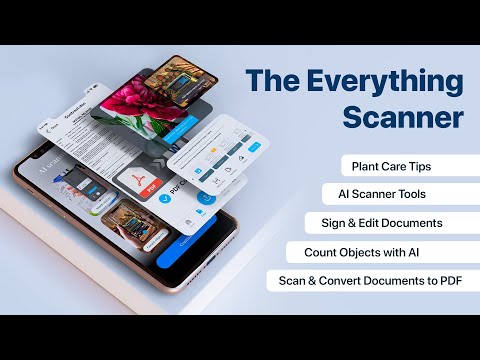
Screenshots of PDF Scanner app - TapScanner

  • PDF Scanner app - TapScanner
  • PDF Scanner app - TapScanner
  • PDF Scanner app - TapScanner
  • PDF Scanner app - TapScanner
  • PDF Scanner app - TapScanner
  • PDF Scanner app - TapScanner
  • PDF Scanner app - TapScanner
  • PDF Scanner app - TapScanner
  • PDF Scanner app - TapScanner
  • PDF Scanner app - TapScanner
  • PDF Scanner app - TapScanner
  • PDF Scanner app - TapScanner
  • PDF Scanner app - TapScanner
  • PDF Scanner app - TapScanner
  • PDF Scanner app - TapScanner
  • PDF Scanner app - TapScanner
  • PDF Scanner app - TapScanner
  • PDF Scanner app - TapScanner
  • PDF Scanner app - TapScanner
  • PDF Scanner app - TapScanner
  • PDF Scanner app - TapScanner
  • PDF Scanner app - TapScanner
  • PDF Scanner app - TapScanner
  • PDF Scanner app - TapScanner
  • PDF Scanner app - TapScanner
  • PDF Scanner app - TapScanner
  • PDF Scanner app - TapScanner

Description of PDF Scanner app - TapScanner (from google play)

TapScanner: Scan, Edit & Manage PDFs with Ease

Turn your device into a high‑quality document scanner and PDF toolkit trusted by millions worldwide. TapScanner lets you capture, organize, and share paperwork quickly, securely, and professionally.

Why Choose TapScanner?

High‑Quality Scans
Automatic edge detection and smart image correction create clear, professional scans of receipts, business cards, contracts, and multi‑page documents.

Complete PDF Workspace
Merge, split, reorder, sign, and annotate PDFs directly in the app. Export to standard PDF formats with no quality loss.

OCR Text Recognition
Convert images into searchable, editable text in over 110 languages.

Productivity Boosters
Save time with batch scanning, one‑tap renaming, and automated file organization.

Secure Cloud Backup
Sync scans to Google Drive, Dropbox, OneDrive, and more. Add password protection for sensitive documents.

Multi‑Page Support
Scan dozens of pages and compile them into a single, neatly ordered PDF.

Image Enhancements
Adjust brightness and contrast, remove shadows, and apply filters for optimal results.

Instant Sharing & Printing
Send scans via email, messaging apps, or print directly to any Wi‑Fi printer.

User‑Friendly Interface
Clean design makes advanced tools easy for professionals, students, and everyday users alike.

Download TapScanner and streamline your paperwork today!

Free Trial & Subscription Details
After the free trial period, if the user does not cancel, the subscription will automatically convert to the paid version and be billed at the selected package price.
You can cancel the subscription at any time via the Google Play app by tapping the profile icon > Payments & subscriptions > Subscriptions.

Privacy Policy - https://tap.pm/privacy-policy-v5/
Service Terms - https://tap.pm/terms-of-service/

What's new in PDF Scanner app - TapScanner

New in TapScanner 3.1.23
Just like your documents, TapScanner needs some editing sometimes too. In this version you will find improvements and bug fixes. We are working hard to improve the app. If you’re satisfied, we’d appreciate it if you rate the app!
Please rate this app

PDF Scanner app - TapScanner Version History: APK Size & Android Support

Explore the version history of PDF Scanner app - TapScanner for Android and see how the app has evolved over time. This section tracks versions added to the apkcafe-ir.com catalog, including download size, declared permissions, and Android compatibility. Select a time period or a point on a chart to explore historical version data.

PDF Scanner app - TapScanner Catalog Statistics

PDF Scanner app - TapScanner Versions Added by Quarter

Q4 20261 version added
New versions in the catalog

12 new PDF Scanner app - TapScanner versions were added to the apkcafe-ir.com catalog in 2026. The catalog contains 129 versions dating back to December 2018.

PDF Scanner app - TapScanner Download Size History

3.1.23Oct 5, 202655.03 MB APKS: 47.78 MB base + 7.24 MB split parts
APKAPKS (split APK)

The PDF Scanner app - TapScanner download size for most phones increased from 45.2 MB in version 1.0.1152 (2018) to 55.03 MB in version 3.1.23, a 22% increase. 27 of 129 versions in the catalog are APKS (split APK), starting with version 2.5.69 (February 2021).

PDF Scanner app - TapScanner Permissions History

3.1.23Oct 5, 202624 permissions
Permissions declared by the version

PDF Scanner app - TapScanner 3.1.23 declares 24 permissions, 11 more than version 1.0.1152 from 2018 (13).

PDF Scanner app - TapScanner Android Compatibility History

3.1.23Oct 5, 2026Android 10+, built for 16
Requires (minimum Android)Built for (target Android)

PDF Scanner app - TapScanner 3.1.23 requires Android 10 or newer and is built for Android 16; version 1.0.1152 from 2018 ran on Android 4.1 or newer.

Older versions of PDF Scanner app - TapScanner. The apkcafe-ir.com catalog has 129 versions of PDF Scanner app - TapScanner, from 1.0.1152 (Dec 2018) to PDF Scanner app - TapScanner 3.1.23 (Oct 5, 2026). If the latest version has a bug, changed something you rely on or does not work on your phone, you can install an earlier one from the list of older PDF Scanner app - TapScanner APK versions below.

Version 3.1.23 needs Android 10 or newer. On older phones: Android 9 runs up to version 3.0.93 (Jan 2026), Android 5.0 runs up to version 2.8.59 (Jun 2024).

Android does not install an older version over a newer one, so uninstall PDF Scanner app - TapScanner first. This usually deletes the app's data on the phone, so back up anything you need.

Dates show when each version was added to the apkcafe-ir.com catalog. Size is the full download for most phones (APK and split parts); permissions are for the same build.

PDF Scanner app - TapScanner 3.1.23 permissions

No high-risk permissions found: No high-risk permissions24

Worth knowing

  • Uses your advertising IDFor personalised ads and ad measurement. You can reset or delete it in Settings, Privacy, Ads.
  • In-app purchasesMay offer paid content through Google Play.
Asks firstShow the list (5)
  • Cameratake pictures and videos
  • Photos and videosread image files from shared storage Android 13+, read user selected image and video files from shared storage Android 14+
  • Filesread the contents of your shared storage up to Android 12L
  • Notificationsshow notifications Android 13+
Granted automaticallyShow the list (19)
  • connect and disconnect from Wi-Fi
  • control vibration
  • get ad topics based on your app use (Android ad services)
  • have full network access
  • in-app purchases through Google Play
  • learn how the app was installed (install referrer)
  • measure ad clicks and installs (Android ad services)
  • prevent phone from sleeping
  • read Google services configuration
  • receive push messages
  • run at startup
  • run foreground service
  • see mobile network type and SIM status Android 13+
  • use biometric hardware
  • use fingerprint hardware
  • use the advertising ID
  • use the advertising ID (Android ad services)
  • view network connections
  • view Wi-Fi connections

Hardware

Made for devices with: Rear camera, Camera with autofocus

Permission changes

No changes since 3.1.19.

More info

Advertisement

PDF Scanner app - TapScanner Older APK Versions for Android

Similar apps

Popular android apps